
Quick Answer
Xtreme HD IPTV offers five plan lengths (1 month, 3 months, 6 months, 1 year and lifetime) for 1, 2, 4 or 5 devices. At the time of writing, prices run from $15.99 for one device for one month to $900 for a five-device lifetime plan. Longer plans cost much less per month: a one-year plan works out to $11.75 a month for one device, compared with $15.99 on the monthly plan. If you are new, start with a short plan or the free trial. If you already know you will stay, a 6-month or 1-year plan gives the best value.
What Every Plan Includes
The plans page lists the same features on every plan. Only the length and the number of devices change:
- 20,000 channels and VOD
- 4K Ultra HD quality
- Anti-freeze technology
- 24/7 active support
That makes choosing simple: you are deciding two things, how long you want to subscribe and how many devices you need.
Xtreme HD IPTV Prices at a Glance
| Plan length | One device | Two devices | Four devices | Five devices |
| 1 month | $15.99 | $26.98 | $56.98 | $66.98 |
| 3 months | $45.99 | $66.98 | $86.98 | $96.98 |
| 6 months | $74.99 | $95.98 | $115.98 | $125.98 |
| 1 year | $140.99 | $181.98 | $221.98 | $241.98 |
| Lifetime | $500 | $600 | $800 | $900 |
What Each Plan Costs per Month
The headline price hides the real cost. This table divides each plan by the number of months it covers:
| Plan length | One device | Two devices | Four devices | Five devices |
| 1 month | $15.99 | $26.98 | $56.98 | $66.98 |
| 3 months | $15.33 | $22.33 | $28.99 | $32.33 |
| 6 months | $12.50 | $16.00 | $19.33 | $21.00 |
| 1 year | $11.75 | $15.17 | $18.50 | $20.17 |
What this shows
- For one device, a 1-year plan costs 26.5% less per month than the monthly plan, which saves about $51 over a year.
- For two devices, the 1-year plan costs 43.8% less per month, which saves about $142 over a year.
- For four and five devices, the monthly price is high. The 3-month plan costs about half as much per month, and the 1-year plan costs about 68% to 70% less.
- The jump from a 6-month to a 1-year plan is small. If you can commit for 6 months, you are already getting most of the savings.
How to Choose Your Plan Length
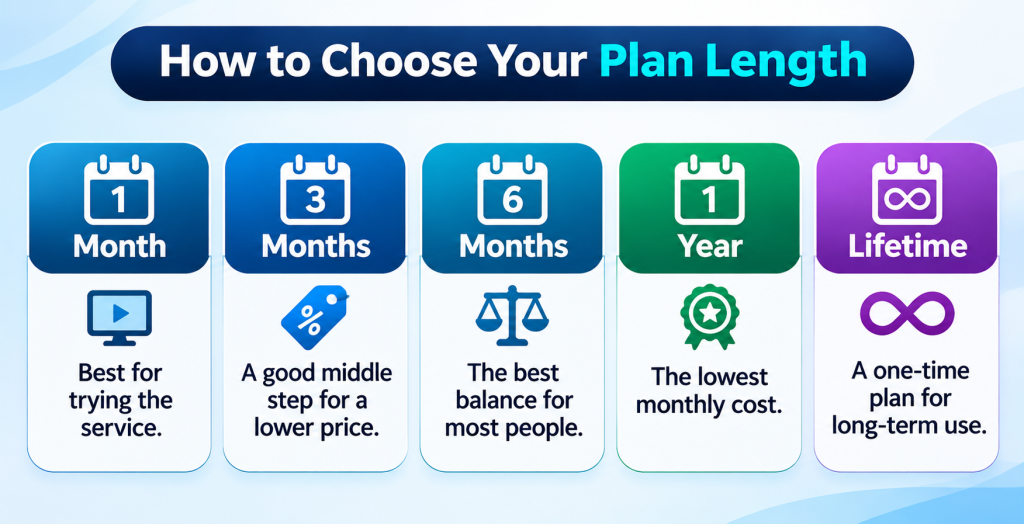
1 month: best for trying the service. It has the highest monthly price, so don’t stay on it longer than you need to, especially with 4 or 5 devices.
3 months: a good middle step if you want a lower price but are not ready for a long commitment. It saves little on a single device (4.1%) but a lot on larger plans.
6 months: the best balance for most people. It saves 21.8% per month on one device and 40.7% on two.
1 year: the lowest monthly cost on the subscription plans. Choose it once you have tested the service on your own devices and internet connection.
Lifetime: see the next section.
How to Choose the Number of Devices
The cost of an extra device falls quickly as you add more. On the 1-year plan, the cost per device per month is:
| Devices | Cost per device per month (1-year plan) |
| 1 device | $11.75 |
| 2 devices | $7.58 |
| 4 devices | $4.63 |
| 5 devices | $4.03 |
The fifth device costs only $20 more per year than the fourth, so if you are close to four devices, five is the better deal.
Before you pick, ask whether “devices” means devices streaming at the same time or devices registered to the account. Count the screens you actually use at the same moment: living room TV, bedroom TV, phone, tablet.
The Lifetime Plan: Is It Worth It?
The lifetime plan is a single payment: $500, $600, $800 or $900, depending on devices.
To judge it, compare it with the 1-year plan:
| Devices | Lifetime price | 1-year price | Years until lifetime breaks even |
| 1 | $500 | $140.99 | about 3.5 years |
| 2 | $600 | $181.98 | about 3.3 years |
| 4 | $800 | $221.98 | about 3.6 years |
| 5 | $900 | $241.98 | about 3.7 years |
That means you would need to use the service for about three and a half years for the lifetime plan to cost less than renewing yearly.
Before you buy a lifetime plan, check the terms for:
- What “lifetime” covers, for example whether it lasts as long as the service operates
- Whether support and updates are included for the whole period
- Whether it can be refunded or transferred
- Whether the number of devices can be changed later
If the terms are not clear, a 1-year plan carries much less risk.
Which Plan Fits You? Quick Guide
| Your situation | Suggested plan |
| You want to test the service | Free trial first, then 1 month with 1 device |
| One viewer, regular use | 6 months or 1 year, 1 device |
| Two people or two rooms | 6 months or 1 year, 2 devices |
| A family with several TVs | 1 year, 4 or 5 devices |
| You are sure you will stay for years | Lifetime, after reading the terms |
Before You Pay: Seven Checks
- Use the free trial if one is offered, and test it on the devices you plan to use.
- Check device support. Your devices should be on the supported list: iPhone, Android, Smart TV, Android TV, Firestick, Google Chromecast, Apple TV, Nvidia Shield TV Pro and Roku, plus Windows, macOS and MAG devices. See the installation guide for setup steps.
- Test your internet. 4K needs about 40 Mbps or more, and HD about 10 to 15 Mbps per stream.
- Read the terms and refund policy. Our guide to consumer rights and refund policies for IPTV users explains what to look for.
- Use a payment method with buyer protection, and keep your receipt.
- Make sure you are on the official site. Our checklist on whether Xtreme HD IPTV is legit covers nine checks.
- Know how to reach support. Read our guide to Xtreme HD IPTV customer support or use the contact page.
After You Order
- Keep your sign-in details safe. Save your username, password and any server address in a password manager. Our guide to managing your account, devices and subscriptions shows where each detail goes.
- Set up your device. Follow the setup guide for Firestick and Android.
- Download only from the official site. Read whether the Xtreme HD IPTV APK is safe before you install a file.
- Note your renewal date so a plan does not expire unexpectedly.
- See what you can watch in the channel list.
Final Thoughts
The plan that suits you comes down to two numbers: how many months and how many devices. For most people, a 6-month or 1-year plan gives the best value, and a lifetime plan only makes sense if you plan to stay for more than three and a half years and the terms are clear. Test first, count your screens, and compare the monthly cost instead of the headline price.
Ready to compare for yourself? See the current plans on the Xtreme HD IPTV homepage.
Frequently Asked Questions
How much does Xtreme HD IPTV cost?
At the time of writing, plans range from $15.99 for one device for one month to $900 for a five-device lifetime plan. The 1-year plan starts at $140.99 for one device.
What plan lengths does Xtreme HD IPTV offer?
There are five: 1 month, 3 months, 6 months, 1 year and lifetime.
How many devices can I add to a plan?
Plans are available for 1, 2, 4 or 5 devices. Ask support whether this means devices streaming at the same time or devices registered to your account.
Which plan is the best value?
For most people, 6 months or 1 year. On one device, the 1-year plan works out to $11.75 a month compared with $15.99 on the monthly plan.
Is the lifetime plan worth it?
It breaks even against the 1-year plan after about 3.3 to 3.7 years, depending on devices. Read the terms first to see what lifetime covers.
Do all plans include the same features?
Yes. Every plan lists 20,000 channels and VOD, 4K Ultra HD quality, anti-freeze technology and 24/7 active support. Only the length and number of devices differ.
Is there a free trial?
The homepage offers a free IPTV application trial for sign-ups. Check the current terms and what the trial includes before you start.
Can I upgrade to more devices later?
Ask support before you buy. Upgrade rules are not shown on the plans page.
Which devices work with Xtreme HD IPTV?
IPhone, Android, Smart TV, Android TV, Firestick, Google Chromecast, Apple TV, Nvidia Shield TV Pro and Roku, plus Windows, macOS and MAG devices.

In the digital age, the way we consume television and media has undergone a significant transformation, and Internet Protocol Television Read more

The landscape of the streaming industry has changed dramatically in recent years, with several players vying for dominance. Typhoon IPTV Read more

How to jailbreak a Chromebook? Chromebooks have gained popularity as lightweight, efficient, and affordable devices that provide seamless integration with Read more

Kemo IPTV is a popular IPTV service provider that delivers television programs and other video content to your device. The Read more