
Explore a curated directory of third‑party tools, apps, and utilities built to improve IPTV streaming and VOD — from playback apps to performance and subscription utilities.
As streaming habits evolve, third‑party apps and utilities have become key to getting the most from IPTV. They simplify access to live channels and on‑demand libraries, reduce friction, and boost playback reliability. This guide walks you through the most useful tools for IPTV services, explains what they do, and shows which features matter when you’re choosing players, VOD helpers, subscription managers, and performance optimizers.
Key Takeaways
- Third‑party IPTV apps make streaming easier with cleaner interfaces and quick access to live TV and VOD libraries.
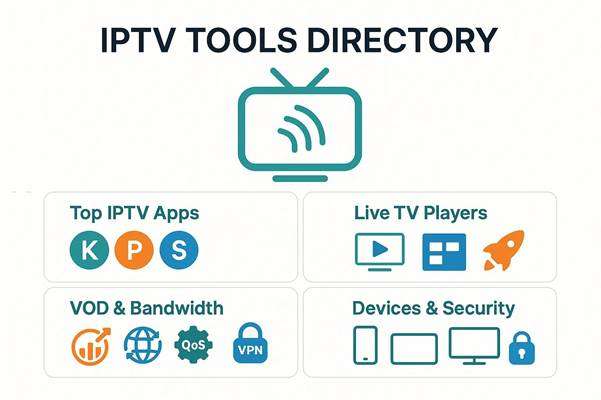
- Top IPTV players like IPTV Smarters and TiviMate combine advanced features with broad device support.
- VOD utilities raise playback quality using adaptive bitrate streaming and efficient CDN delivery.
- Good subscription management tools prioritize intuitive controls, multi‑platform compatibility, and dependable support.
- Device compatibility tools help you watch across phones, tablets, and smart TVs with synced profiles and history.
- Streaming utilities optimize bandwidth and stability through custom firmware, network storage, and QoS tuning.
- Content aggregators widen channel choices, cut costs, and make discovery faster for viewers.
- Guides, tutorials, and community forums are essential for installing, configuring, and troubleshooting IPTV apps.
- Using a VPN with IPTV boosts privacy, helps bypass geo‑blocks, and can reduce ISP throttling.
What Are the Best Third-Party Apps for IPTV Streaming?
Several third‑party apps stand out for delivering a smooth, feature‑rich IPTV experience. They streamline channel browsing, playlist handling, and VOD playback. Notable options include:
- Kodi: A flexible, open‑source media center with a wide range of add‑ons for IPTV and VOD playback.
- Perfect Player: Favored for its clean layout and support for multiple playlist formats and EPGs.
- IPTV Smarters: User‑friendly with EPG support, multi‑screen options, and easy account setup.
If you want a ready‑made channel lineup and dependable VOD access, subscribing to Xtreme HD IPTV gives you a broad selection of live channels and on‑demand content to complement these apps.
Which IPTV Player Apps Offer the Best Live TV Experience?

High‑quality IPTV players are central to a smooth live TV experience. These apps are widely recommended for their responsiveness and customization:
- IPTV Smarters: Well‑rounded and easy to set up; great for families and multi‑user setups.
- TiviMate: Built for live TV with features like catch‑up, channel grouping, and a customizable UI.
- OTT Navigator IPTV: Highly configurable and compatible with many playlist formats and sources.
All three offer cross‑device compatibility, making them solid choices for diverse viewing setups.
How Do Video On Demand Utilities Enhance Streaming Quality?
VOD utilities improve playback by combining adaptive bitrate streaming, CDN optimizations, and smarter buffering strategies. They adjust quality to your bandwidth, speed up load times, and make browsing large libraries easier. The end result is fewer stalls, clearer streams, and a cleaner interface for finding shows and movies.
How to Choose Top Utility Tools for IPTV Subscription Management?
Picking the right subscription manager helps you keep accounts organized and your service running smoothly. Focus on tools with these strengths:
- User Interface: A simple, well‑organized UI reduces setup time and support calls.
- Compatibility: Broad device and platform support ensures everyone in your home can connect.
- Customer Support: Fast, knowledgeable support is vital for resolving service or access issues.
Prioritizing these factors helps you manage subscriptions without headaches and ensures a consistent viewing experience.
What Features Should You Look for in Subscription Service Apps?
When comparing subscription apps, look for features that make daily use frictionless and transparent:
- User Interface: Clear menus, easy navigation, and sensible defaults improve usability.
- Pricing Models: Transparent, predictable pricing helps you choose the right plan.
- Customer Support Options: Multiple support channels (chat, email, docs) make troubleshooting quicker.
These elements help you get the most value and avoid surprises after purchase.
How Do Device Compatibility Tools Improve IPTV Access?
Device compatibility tools make IPTV accessible across platforms and simplify switching between devices. Key benefits include:
- Multi-Device Support: Watch on phones, tablets, smart TVs, and set‑top boxes without reconfiguring playlists.
- Synchronization Capabilities: Keep your watch history, favorites, and resume points synced between devices.
- User Experience Enhancements: Device‑specific tweaks (remote control layouts, TV mode) improve comfort and navigation.
These tools remove friction and let you pick up where you left off on any screen.
Which Live TV Streaming Tools Provide Reliable Global Access?
For broad, dependable access to live TV across regions, these tools are reliable choices:
- VLC Media Player: Handles many streaming protocols and is a dependable, lightweight option.
- GSE Smart IPTV: Flexible and supports a wide range of sources and playlist formats.
- Live NetTV: Aggregates numerous live channels from around the world for quick access.
Each tool has strengths depending on your setup and the formats you rely on.
How Do Third-Party Streaming Utilities Optimize Bandwidth and Performance?
Third‑party utilities improve streaming stability and quality with several practical approaches:
- Custom Firmware for Routers: Tweaks and optimizations can reduce latency and improve throughput.
- Network Storage Solutions: Local caching and NAS solutions speed up access to frequently viewed content.
- Quality of Service Settings: Prioritizing streaming traffic helps prevent interruptions when the network is busy.
Applying these strategies reduces buffering and delivers a smoother viewing session.
What Are the Benefits of Integrated Media Content Aggregators?
Content aggregators bring multiple sources into a single interface, offering clear advantages:
- Expanded Content Access: Broader channel and VOD choices in one place.
- Cost-Effectiveness: Bundled access can lower overall spend versus multiple separate services.
- Enhanced User Experience: Unified search and discovery make it easier to find shows and channels.
Aggregators simplify discovery and can deliver more value for the same subscription budget.
Where Can You Find User Guides and Tutorials for IPTV Third-Party Apps?
Helpful resources for learning and troubleshooting IPTV apps include:
- Official Websites: Many apps publish detailed setup guides and troubleshooting articles.
- YouTube Channels: Step‑by‑step video tutorials are great for visual learners.
- User Forums: Community threads often solve real‑world problems and share tips.
Combining official docs with community advice usually gets you past most setup hurdles.
How to Install and Configure Popular IPTV Apps Step-by-Step?
Typical installation and setup follows three basic steps:
- Download the App: Find the app in your device’s app store or the developer’s site.
- Install the App: Run the installer and accept any required permissions.
- Configure Settings: Enter your IPTV credentials, load your playlist or portal, and adjust playback options.
Following those steps gets most users up and running quickly.
What Are Common Troubleshooting Tips for IPTV Utilities?
If you run into issues, try these quick fixes first:
- Check Internet Connection: Make sure your connection is stable and meets streaming speed requirements.
- Restart the App: Close and reopen the app to clear temporary glitches.
- Update the App: Install the latest updates for performance improvements and bug fixes.
These basic steps resolve most routine problems and keep streams reliable.
Frequently Asked Questions
What are the key differences between IPTV and traditional cable TV?
IPTV delivers television over the internet, giving you on‑demand options and flexible device access. Traditional cable uses dedicated coaxial or fiber lines and usually requires a set‑top box. IPTV tends to offer more viewing choices and works across phones, tablets, and smart TVs, while cable typically offers a fixed channel lineup tied to your home connection.
Can I use IPTV services on multiple devices simultaneously?
Yes—many IPTV providers permit simultaneous streams, which is useful for households with different viewing needs. The exact number of concurrent streams depends on your provider and subscription tier, so check your plan details to avoid service limits.
Are there any legal concerns with using third-party IPTV apps?
Legal concerns arise if an app or service distributes copyrighted content without proper licensing. While many apps are legitimate, some sources may carry unauthorized streams. Always choose providers and apps that comply with copyright rules in your country to avoid legal risks.
How can I improve the streaming quality of my IPTV service?
To improve quality: use a stable, high‑speed internet connection (preferably wired), enable QoS on your router to prioritize streaming, keep your IPTV app updated, and limit competing network traffic during viewing. These steps reduce buffering and improve stream consistency.
What should I do if my IPTV app is not working properly?
Start by verifying your internet connection, then restart the app and device. If issues persist, check for app updates or reinstall the app. Consult the app’s support pages or community forums for fixes specific to your problem.
Are there any recommended security measures for using IPTV services?
Protect yourself by using a reputable VPN to encrypt traffic, avoiding unverified IPTV providers, keeping device software up to date, and running antivirus software where applicable. Be cautious with free services, as they can carry security risks.
What are the advantages of using a VPN with IPTV services?
A VPN improves privacy by masking your IP and encrypting your connection. It can help bypass geo‑restrictions and reduce ISP throttling, often resulting in more consistent streaming performance and access to region‑restricted content.
Conclusion
Third‑party tools and apps can markedly improve your IPTV experience — making playback smoother, discovery faster, and subscription management simpler. By choosing players, VOD utilities, and management tools that fit your devices and viewing habits, you’ll get more reliable streams and a cleaner interface. Browse our curated picks for top IPTV tools and start improving your streaming setup today. Need help choosing the right IPTV setup or have questions? Contact our team.

In the digital age, the way we consume television and media has undergone a significant transformation, and Internet Protocol Television Read more

The landscape of the streaming industry has changed dramatically in recent years, with several players vying for dominance. Typhoon IPTV Read more

How to jailbreak a Chromebook? Chromebooks have gained popularity as lightweight, efficient, and affordable devices that provide seamless integration with Read more

Kemo IPTV is a popular IPTV service provider that delivers television programs and other video content to your device. The Read more