
Parental control settings for VOD content
Streaming has become the default for family entertainment, and protecting kids from unsuitable content is a top priority. Parental controls for Video On Demand (VOD) let parents choose what children can watch, set limits, and keep an eye on viewing habits. Below we cover setup steps, core features, practical tips, and how Xtreme HD IPTV’s parental controls help keep family streaming safer and simpler.
Key Takeaways
- Parental controls for VOD let parents block inappropriate material and tailor what kids can access.
- Setup typically requires a secure password and customized viewing restrictions on each streaming device.
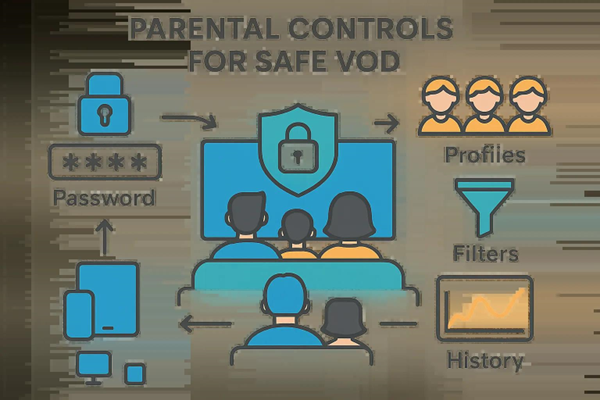
- Core features include content filters, password protection, and viewing-history logs for oversight.
- Xtreme HD IPTV includes strong parental-control options like blocking adult channels and age-based restrictions.
- Creating individual kids’ profiles with specific filters gives each child a personalized, safer experience.
- Regularly reviewing settings keeps protections aligned with your child’s age and maturity.
- Third‑party monitoring apps can add reporting, alerts, and time limits for extra control.
- Collaborative parental-control models can let trusted parents share ratings and recommendations for better content decisions.
- Proper parental controls reduce exposure to harmful content and support healthier viewing habits — and peace of mind for caregivers.
Setup Instructions for Parental Controls
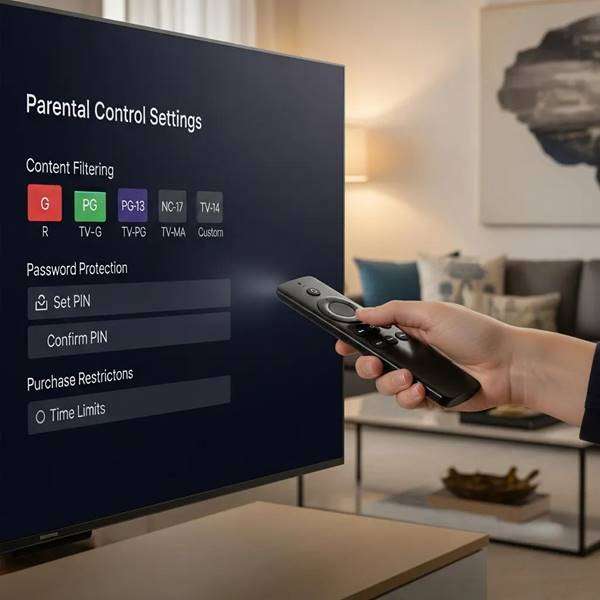
Start in your streaming device’s Settings menu and open Parental Controls. Create a strong password that only adults know — this prevents kids from changing rules or unlocking restricted content. After that, choose filters and age limits that match your family’s preferences.
While PINs and passwords remain standard, emerging research looks at stronger authentication methods to reduce the risk of kids bypassing controls.
Biometric Parental Control for Secure IPTV Systems
This dissertation describes an IPTV approach that replaces simple numeric passcodes with biometric authentication. Traditional IPTV systems often rely on short numeric codes, which present security and usability limits. The work introduces an IPTV prototype using biometric sign-in instead of PINs and evaluates its effectiveness compared with conventional numeric passwords.
Improving STB Devices’ Parental Control, 2018
Key Features of Parental Controls
Parental controls include several tools designed to keep family streaming safe and manageable:
- Content filtering: Block specific ratings, genres, or channels so kids only see appropriate material.
- Password protection: Require an adult PIN or password to access restricted content or change settings.
- Viewing-history monitoring: Check what’s been watched to understand interests and spot anything concerning.
Xtreme HD IPTV bundles these essentials into an easy-to-use control panel so families can manage viewing across devices without hassle.
Best Practices for Effective Monitoring
To keep parental controls effective over time, follow these simple habits:
- Review settings regularly: Update age limits and filters as your child grows and their needs change.
- Talk about content: Discuss what they watch and why certain restrictions exist to encourage healthy media habits.
- Consider third‑party tools: Use monitoring apps for extra reporting, alerts, or time limits when needed.
Beyond personal setups, some researchers propose collaborative systems where trusted parents share ratings and tags to help decide what’s suitable.
Collaborative IPTV Parental Control & Monitoring
From a parent’s view, the ideal is to decide dynamically whether content is suitable. Because that’s hard to scale alone, an intermediate solution lets parents rely on a trusted network of other parents. The model uses (1) a parenting social network for sharing opinions and tagging content and (2) trust relationships among parents. The proposed system applies social technologies to parental monitoring for DVB‑IPTV content.
IPTV parental control: A collaborative model for the Social Web, A Fernández‑Vilas, 2015
How Do I Set Up Parental Controls on Xtreme HD IPTV?
Setting up parental controls on Xtreme HD IPTV is quick. Follow these steps:
- Access Settings: Open the Settings menu on your Xtreme HD IPTV device.
- Select Parental Controls: Choose the parental-controls option from the menu.
- Create a secure password: Enter a strong PIN or password that adults will use to unlock restricted content.
- Block adult content: Turn on the block for adult channels and set age-based viewing limits.
These steps help ensure a safer viewing experience for everyone in the home.
Available Features
Xtreme HD IPTV’s parental controls include:
- Block adult channels: Prevent access to channels with mature content.
- Set viewing restrictions: Apply age-rated limits so kids only see appropriate shows and movies.
- Monitor viewing history: Review what profiles have watched to guide conversations and updates.
Customization Options
Make parental controls fit your family by using these customization options:
- Tailor the experience: Adjust filters and limits to match each child’s age and maturity.
- Remove adult channels: Easily block channels that aren’t family-friendly.
- Specify age ratings: Choose the exact age thresholds for acceptable content.
Understanding Age-Based Content Filtering and Parental Lock Options
Age-based filtering lets you block material that falls outside a child’s allowed age range. Parental locks prevent entry to restricted categories unless an adult unlocks them. Together these tools protect children from unsuitable content while giving parents control over what the household watches.
How Can I Manage Kids Profiles and Access on Xtreme HD IPTV?
Creating and managing kids’ profiles gives each child a customized, safer streaming experience. Here’s how:
- Access Settings: Open the Settings menu on your device.
- Create a password: Set a PIN or password specifically for parental functions and kids’ profile changes.
- Enable content restrictions: Assign age‑appropriate filters and limits for each profile.
Creating and Customizing Secure Kids Profiles
Steps to make secure kids’ profiles:
- Access Settings: Go to the device settings.
- Set a password: Create a PIN for profile protection.
- Block adult content: Ensure adult material is restricted for those profiles.
Custom profiles help keep viewing safe and tailored to each child’s needs.
Setting Age Restrictions and Content Filters for Each Profile
To set specific limits per profile:
- Access Settings: Open the settings on your device.
- Set age restrictions: Choose the appropriate rating for each profile.
- Enable content filters: Turn on filters that block unsuitable material.
Applying these controls ensures each child sees content that matches their age and maturity.
What Are the Benefits of Using Parental Controls for Family Streaming Safety?

Parental controls deliver practical benefits that protect children and simplify household media management:
- Content filtering: Ensure kids only see age-appropriate shows and movies.
- Access restrictions: Block channels and content categories that aren’t suitable.
- Monitoring viewing history: Use watch logs to start conversations and make informed adjustments.
These tools help families build safer viewing routines and reduce exposure to harmful content.
Protecting Children from Inappropriate VOD Content
Blocking adult channels and applying viewing limits prevents accidental exposure to unsuitable VOD content. That proactive approach supports healthier media habits and reduces stress for parents.
Enhancing Peace of Mind with Affordable IPTV Parental Controls
Affordable parental-control tools like those in Xtreme HD IPTV combine functionality with easy setup, so parents can protect kids without complex configurations or high costs. That balance of simplicity and effectiveness makes it easier to keep family streaming safe.
Frequently Asked Questions
What types of content can I block using parental controls?
You can block channels, genres, and specific ratings — for example, adult content, graphic violence, or other themes you consider inappropriate. Controls are customizable so you can match restrictions to your child’s age and your family values.
Can I monitor my child’s viewing habits across multiple devices?
Yes. Many systems, including Xtreme HD IPTV, collect viewing history across devices linked to your account so you can see what’s been watched and where. That makes it easier to keep tabs on overall viewing and discuss choices with your child.
How often should I update my parental control settings?
Review settings every few months or whenever your child’s interests or maturity level changes. Regular updates make sure restrictions remain relevant as kids grow.
Are there any additional tools to enhance parental controls?
Yes. Third‑party monitoring apps can add detailed reports, content alerts, and screen-time limits. Pairing those tools with built-in controls creates a more complete safety system.
What should I do if my child bypasses the parental controls?
Address it calmly: talk about why rules exist, change the password if needed, and tighten settings. Open dialogue about media and clear boundaries often prevent repeat attempts.
Can I set different restrictions for each child in my household?
Absolutely. Create separate profiles for each child and set individualized age limits, filters, and viewing preferences so every family member gets an appropriate experience.
Conclusion
Parental controls for VOD are a practical way to protect children and guide healthy viewing habits. With content filters, password protection, and viewing-history tools, families can tailor a safe streaming environment. Xtreme HD IPTV offers robust, user-friendly parental controls so you can set up protections quickly and keep them updated as your family’s needs change. Explore the settings today to start building a safer streaming experience for your household.

In the digital age, the way we consume television and media has undergone a significant transformation, and Internet Protocol Television Read more

The landscape of the streaming industry has changed dramatically in recent years, with several players vying for dominance. Typhoon IPTV Read more

How to jailbreak a Chromebook? Chromebooks have gained popularity as lightweight, efficient, and affordable devices that provide seamless integration with Read more

Kemo IPTV is a popular IPTV service provider that delivers television programs and other video content to your device. The Read more