
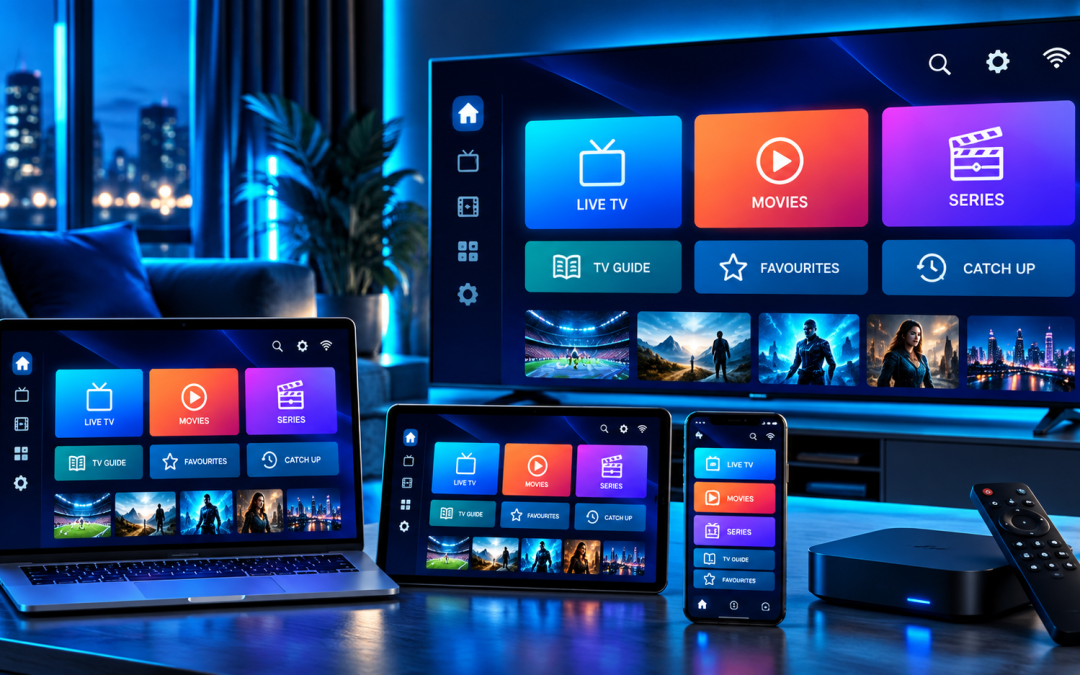
If you have an IPTV subscription but are unsure how to watch it on your TV, phone, or streaming device, an IPTV player can make the setup much easier. IPTV Smarters Pro is one of the better known options for organising and playing IPTV content across supported devices.
The important thing to understand first is that IPTV Smarters Pro does not provide television channels or an IPTV subscription by itself. It is a media player that lets users load content from a separate service or playlist. The official Smarters Pro platform states that the app does not host, sell, or distribute media content.
That means you need two separate things:
- A compatible IPTV player such as IPTV Smarters Pro
- An IPTV subscription or legally acquired playlist from your chosen provider
This guide explains how IPTV Smarters Pro works, what you need before setup, how to add your service, and how to troubleshoot common issues.
What Is IPTV Smarters Pro?
IPTV Smarters Pro is a media player designed to organise and play streaming content supplied by the user or their content provider. Depending on the version and platform, it supports playlist formats such as M3U and JSON and is available across several platforms.
It can be useful for people who want a central interface for live TV, video on demand, series, and other compatible media.
The app itself does not determine which channels you receive. Your content comes from the IPTV service or playlist you connect to the player.
This distinction is important because searching for an IPTV app and searching for an IPTV provider are two different things.
What Do You Need for an IPTV Smarters Setup?
BBefore opening the app, make sure you have everything required for the setup.
You generally need:
- A supported Smart TV, Android TV device, smartphone, tablet, computer, or other compatible device
- A stable internet connection
- IPTV Smarters Pro installed from a legitimate source
- Active IPTV subscription credentials or a compatible playlist
- Server information supplied by your IPTV provider
- Username and password if your provider uses an Xtream Codes login
Your provider may give you an M3U playlist URL or login details for an Xtream Codes API connection. The exact information depends on the service you have purchased.
Xtreme HD IPTV’s FAQ states that its service works with applications supporting Xtream Codes or M3U URLs and specifically lists IPTV Smarters and TiviMate among its recommended players. (Xtreme HD IPTV FAQ)
How to Install IPTV Smarters Pro
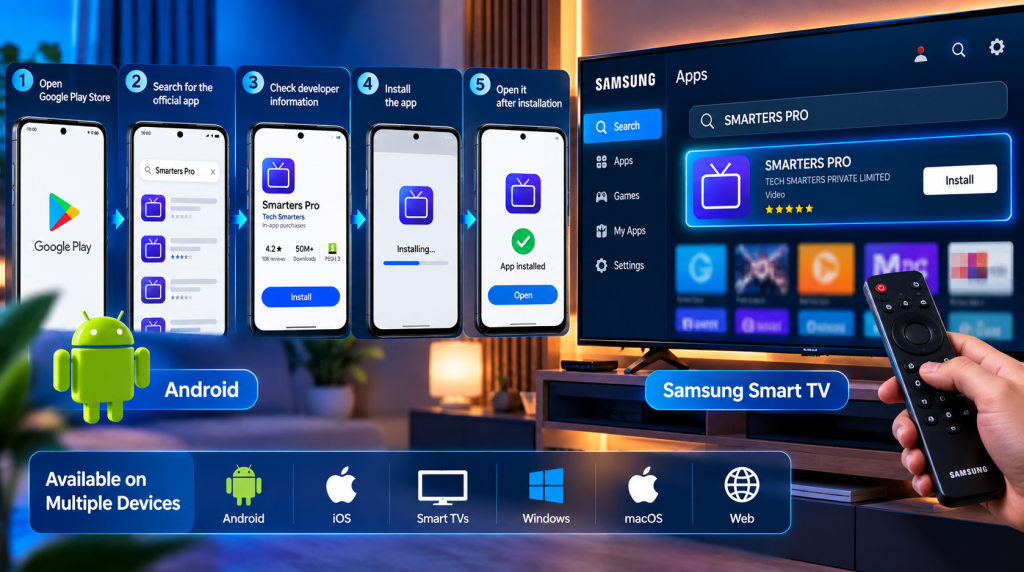
The installation process depends on the device you are using.
The safest approach is to use the official app store or the official Smarters Pro website whenever the application is available there. The official platform currently provides versions for Android, iOS, Smart TVs, Windows, macOS, and web use, although availability can vary by region and device.
On Android
For Android devices:
- Open the Google Play Store.
- Search for the official Smarters Pro application.
- Check the developer information before installing.
- Install the app.
- Open it after installation.
The Google Play listing identifies Tech Smarters as the developer and describes the application as a standalone media player.
On Samsung Smart TV
If your Samsung TV supports the application, open the TV’s Apps section and search for SMARTERS PRO.
The current Samsung listing identifies SMARTERS PRO as a video application from TECH SMARTERS PRIVATE LIMITED. Always verify the developer information before installing an application with a similar name.
If the application is not available on your particular television model or in your region, you may need to use another compatible IPTV player or an external streaming device.
For additional Samsung IPTV options, you can also read the Xtreme HD IPTV guide to IPTV applications for Samsung Smart TVs.
How to Add an IPTV Subscription to IPTV Smarters Pro
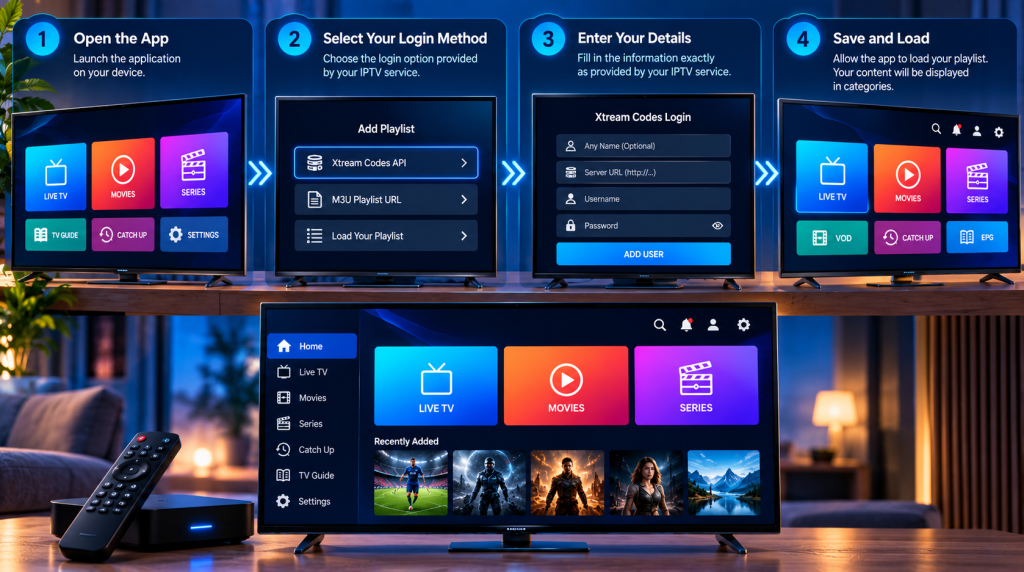
Once the application is installed, you need to connect your IPTV service.
The exact menu names can vary depending on the app version, but the general process is straightforward.
Step 1: Open IPTV Smarters Pro
Launch the application on your device.
You may see an option to add a playlist or log in using information supplied by your provider.
Step 2: Select Your Login Method
Your provider may give you:
- Xtream Codes API details
- An M3U playlist URL
- Another supported playlist format
If your provider gives you Xtream Codes credentials, you will typically need the username, password, and server URL.
Do not enter random credentials found online. Use only information provided by your IPTV service or content source.
Step 3: Enter Your Details
Enter the information exactly as supplied.
Pay close attention to:
- Username
- Password
- Server URL
- Playlist URL if using M3U
A single incorrect character can prevent the playlist from loading.
Step 4: Save and Load the Playlist
After submitting your information, allow the application a moment to load the available content.
Depending on your IPTV subscription, you may see categories such as:
- Live TV
- Movies
- Series
- VOD
- Catch up
- EPG
The available categories depend on the service connected to the player.
How to Use IPTV Smarters Pro on a Smart TV
Using IPTV Smarters Pro as an IPTV player for Smart TV is similar to using it on other supported devices.
Once your IPTV subscription has loaded, use your TV remote to navigate between categories.
For live TV, you can usually browse channel groups and select a channel to start playback.
If your provider supplies EPG data, the electronic program guide can help you see current and upcoming programming. EPG is particularly useful when a service has a large channel lineup because you can find programs without opening every channel individually.
Xtreme HD IPTV also publishes an EPG setup and troubleshooting guide covering common EPG problems and configuration steps.
How to Watch Live TV on IPTV Smarters Pro
Once your playlist has loaded, select the Live TV section.
From there, you can browse available channel groups. Depending on your subscription, groups may include sports, news, entertainment, movies, international channels, or regional programming.
If the player supports favourites, you can save frequently watched channels for quicker access.
For a large IPTV subscription, organising favourites can save considerable time. Instead of scrolling through hundreds or thousands of entries, you can create a shorter list based on what you actually watch.
How to Use VOD on IPTV Smarters Pro
If your IPTV provider includes video on demand, the VOD section can provide access to available movies and other programming.
The player itself does not create the VOD library. The content is supplied through the service or playlist you have connected.
Depending on the provider and app version, you may be able to browse:
- Movies
- TV series
- Recently added content
- Genres
- Favourites
If a VOD category appears empty, check whether your subscription includes VOD and whether your credentials have been entered correctly.
IPTV Smarters Pro Not Loading Channels? Try These Fixes
BOne of the most common IPTV setup problems is an empty playlist or channels that refuse to load.
Try these steps before changing anything else..
Check Your Login Details
Re enter the username, password, and server information supplied by your provider.
Check Your Internet Connection
Open another streaming service or website on the same device. If other services are also struggling, the problem may be your network rather than IPTV Smarters Pro.
Refresh the Playlist
Some changes do not appear immediately. Refreshing or reloading the playlist can help the app retrieve updated information.
Check Your Subscription
An expired IPTV subscription will not load content even if the player itself is working correctly.
Restart the Application
Close IPTV Smarters Pro completely and open it again. A simple restart can resolve temporary loading problems.
If you are using Xtreme HD IPTV, its installation resources provide additional guidance for supported devices.
How to Reduce IPTV Buffering
Buffering is not always caused by the IPTV app. Several parts of the setup can affect playback.
For better performance:
- Use a stable Wi Fi connection.
- Keep your streaming device close to the router.
- Use Ethernet where practical.
- Avoid running several high bandwidth activities at the same time.
- Keep your device and IPTV player updated.
- Check whether the issue affects one channel or the entire playlist.
If only one stream is buffering while other channels play normally, the problem may be related to that particular stream rather than your entire setup.
Your IPTV provider’s server performance can also affect playback, so persistent buffering should be reported to the provider if basic troubleshooting does not resolve it.
Is IPTV Smarters Pro an IPTV Service?
No.
This is one of the most common points of confusion.
IPTV Smarters Pro is an IPTV player, not an IPTV provider. It does not automatically give you live channels, movies, or a subscription.
The official Smarters Pro terms specifically state that the application does not provide, host, sell, or distribute television channels or streaming services.
You therefore need an IPTV service or legally acquired content source separately.
This distinction also helps explain why two people using the same IPTV player can have completely different channel lists and viewing experiences.
Can You Use Xtreme HD IPTV With IPTV Smarters Pro?
Xtreme HD IPTV’s current FAQ states that its service is compatible with applications that support Xtream Codes or M3U URLs and recommends IPTV Smarters and TiviMate as player options. (Xtreme HD IPTV FAQ)
That makes IPTV Smarters Pro a practical option for customers using a compatible Xtreme HD IPTV subscription.
Before beginning the setup, make sure you have your current account credentials available. If you have trouble connecting, check the credentials first and then review the installation information provided by Xtreme HD IPTV.
Is IPTV Smarters Pro Free?
The answer depends on the specific version and platform.
Some versions of Smarters Pro are available to download without an upfront app purchase, while additional features may involve in app purchases. The current Google Play listing, for example, identifies the application as containing in app purchases.
More importantly, the player cost and your IPTV subscription are separate.
Paying for a player does not automatically give you access to IPTV channels.
Is IPTV Smarters Pro Safe to Use?
The application itself is a media player. However, users should pay attention to where they download it and what content sources they connect to it.
Use official app stores or the application’s official website where possible. Avoid downloading modified versions from unknown websites.
You should also use IPTV services and content that you are legally authorised to access in your location. The Smarters Pro terms place responsibility on users to ensure that the content they access complies with applicable copyright laws.
Why Use an IPTV Player Instead of a Traditional TV App?
An IPTV player can provide a central interface for compatible playlists and services.
Depending on the player and provider, users may benefit from:
- Centralised channel organisation
- EPG support
- VOD categories
- Favourites
- Multiple playlists
- Search functionality
- Support across different devices
This can be particularly convenient if you already have a compatible IPTV subscription and want a familiar interface for accessing your content.
Final Thoughts
Setting up IPTV Smarters Pro is relatively straightforward once you understand the difference between the player and the IPTV service.
Install the application from a legitimate source, obtain your IPTV subscription credentials, select the appropriate login method, and enter the details supplied by your provider. From there, you can organise live TV, VOD, EPG, and other available content through the player.
If you are using Xtreme HD IPTV, the service supports IPTV players that work with Xtream Codes and M3U URLs, with IPTV Smarters listed among its recommended options.
Ready to set up your IPTV service?
Visit Xtreme HD IPTV to explore the current subscription options, check device compatibility, and get started with your IPTV streaming setup.
FAQs
You can install and open the player without a subscription, but the app does not provide channels or IPTV content itself. You need a compatible content source or IPTV service.
Check your username, password, server URL, playlist, subscription status, and internet connection. If the details are correct, contact your IPTV provider for assistance.
Yes, availability depends on the television brand, model, operating system, and region. Current Smarters Pro listings include support for compatible Smart TV platforms.
No. IPTV Smarters Pro is a media player. It does not provide or sell TV channels, movies, or IPTV subscriptions.
Your IPTV provider may give you Xtream Codes credentials consisting of a username, password, and server URL, or an M3U playlist URL. Use the exact information supplied by your provider.

In the digital age, the way we consume television and media has undergone a significant transformation, and Internet Protocol Television Read more

The landscape of the streaming industry has changed dramatically in recent years, with several players vying for dominance. Typhoon IPTV Read more

How to jailbreak a Chromebook? Chromebooks have gained popularity as lightweight, efficient, and affordable devices that provide seamless integration with Read more

Kemo IPTV is a popular IPTV service provider that delivers television programs and other video content to your device. The Read more