
Practical steps to fix playback troubles on your streaming devices.
Fix Common Device Playback Issues
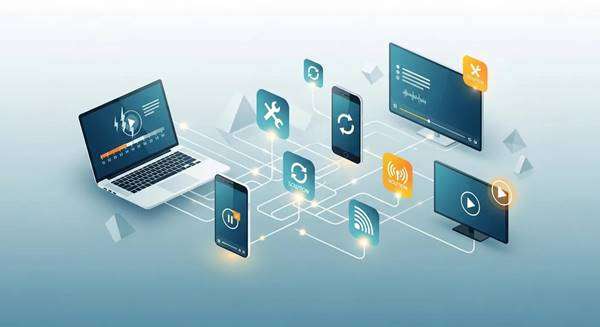
Playback hiccups like buffering, lag, or stutter can ruin movie night. This guide walks you through the usual causes and practical fixes so you can enjoy smoother streaming with Xtreme HD IPTV. We cover troubleshooting steps, device and app settings, and simple network tweaks that reduce interruptions. Key areas include stopping buffering, fixing lag, and optimizing smart TV settings for the best results.
Key Takeaways
- Buffering usually comes from limited bandwidth, busy networks, or older device hardware.
- Wired Ethernet delivers steadier performance and fewer interruptions than Wi‑Fi.
- Clearing app cache and keeping apps and firmware up to date improves playback reliability.
- Tweaking TV settings—refresh rate, resolution, and buffer size—can cut down stutter.
- Router tweaks, DNS choices, and QoS can meaningfully boost streaming stability.
- Expect at least 10 Mbps for HD and 25 Mbps for 4K to avoid playback issues.
- Start troubleshooting by checking your connection, restarting apps, and testing on another device.
- Xtreme HD IPTV works on iPhone, Android, and most smart TVs for flexible viewing.
- Subscription perks like HD streaming and anti‑freeze tech help keep playback smooth.
How Can You Resolve Buffering Problems on IPTV Devices?
Buffering breaks the flow of what you’re watching. Try these quick, effective fixes:
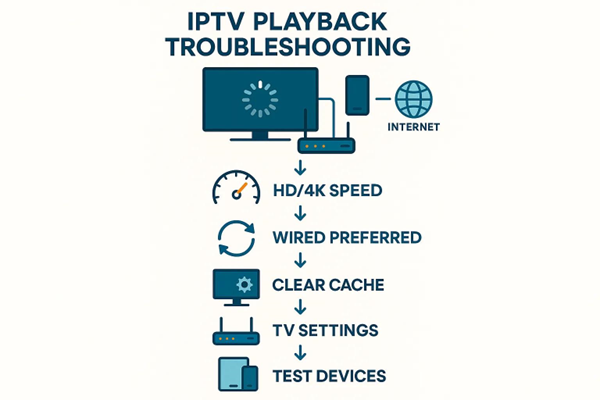
- Check Internet Speed Requirements: Verify your connection meets the streaming speed needed for your chosen quality.
- Use Wired Connections for Stability: Plug the device into your router with Ethernet whenever possible for consistent throughput.
- Clear Cache and Update Apps: Remove old app cache and install the latest app and firmware updates to prevent software slowdowns.
Applying these steps usually reduces buffering and restores a steady stream.
What Causes Buffering in IPTV Streaming?
Knowing the root causes helps you pick the right fix. Common reasons include:
- Insufficient Bandwidth: High‑resolution streams need more speed—insufficient bandwidth leads to pauses.
- Network Congestion: Peak hours or many devices on the same network can slow streaming performance.
- Device Performance Issues: Older or overloaded devices may struggle to decode and play video smoothly.
Spotting which of these applies lets you prioritize fixes that make the biggest difference.
Which Steps Reduce IPTV Lag and Improve Buffering?
Try these routine checks to cut lag and stabilize playback:
- Run Speed Tests Regularly: Confirm your upload and download speeds meet streaming needs.
- Use a Wired Connection: Ethernet reduces packet loss and latency compared with Wi‑Fi.
- Clear Cache and Close Background Apps: Free up CPU and memory so the streaming app can run smoothly.
These basic steps often translate to noticeably smoother viewing.
What Are the Best Methods to Fix Video Stuttering on Smart TVs?
When video stutters on a smart TV, try these targeted fixes:
- Check Refresh Rate Settings: Match the TV’s refresh rate to the content to avoid judder and frame skips.
- Inspect Cables and Connections: Replace or reseat HDMI and network cables if they’re loose or damaged.
- Update Software Regularly: TV firmware and app updates often include playback improvements and bug patches.
These adjustments typically smooth out playback and reduce visible stutter.
How Does Device Firmware Affect IPTV Video Stutter?
Firmware controls how your device processes streams. Outdated firmware can cause playback glitches, decoding errors, and compatibility issues. Installing firmware updates keeps your device aligned with current streaming codecs and delivery methods, which reduces stutter and improves reliability.
Which Smart TV Settings Optimize IPTV Playback Smoothness?
Small TV setting changes can have a big impact. Consider these tweaks:
- Adjust Video Quality Settings: Drop resolution when bandwidth is limited to prevent frequent buffering.
- Enable Adaptive Streaming: Let the player automatically scale quality to match your available bandwidth.
- Optimize Buffer Size: If your app allows it, increasing the buffer helps smooth short network hiccups.
These settings, combined with adaptive playback logic, help maintain continuous viewing on smart TVs.
Optimizing Smart TV Media Playback & Buffer for IPTV
Optimization through DASH platforms and QoS scheduling can improve adaptive playback. This research focuses on smart buffer adjustments to make adaptive media players more effective.
Optimization of adaptive media player algorithm for smart TV terminal, 2019
How Do You Troubleshoot IPTV Playback Issues Across Different Devices?
Troubleshooting steps vary by device, but these universal actions often fix most issues:
- Check Internet Connection: Confirm the device is online and the connection is steady.
- Restart the IPTV Application: Close and reopen the app to clear temporary faults.
- Clear Cache and Data: Resetting the app’s cache can eliminate corrupted files that cause crashes or slowdowns.
Use these steps as your first line of defense across phones, boxes, and TVs.
Which Devices Are Most Compatible with Xtreme HD IPTV Service?
Xtreme HD IPTV supports a broad range of hardware, including:
- iPhone: Smooth streaming on modern iOS devices.
- Android Mobile: Full access to channels and VOD on Android phones and tablets.
- Smart TV: Large‑screen playback with tuned settings for TV viewing.
These platforms make it easy to watch Xtreme HD IPTV whenever and wherever you prefer.
What Are Device-Specific Troubleshooting Tips for IPTV Playback?
Different platforms may need different fixes. Try these device‑targeted tips:
- Check Device Settings: Verify network, display, and power options are optimized for streaming.
- Update Device Firmware: Firmware updates often fix playback bugs and improve codec support.
- Test on Another Device: Switching devices helps identify whether the issue is the device or the service.
These targeted checks narrow down problems faster and get you back to watching.
How Can Network Optimization Improve IPTV Streaming Quality?
Network tuning often yields the biggest improvements. Try these adjustments:
- Router Configuration: Place your router centrally, update firmware, and avoid signal obstructions.
- DNS Optimization: A faster DNS server can reduce lookup delays and speed channel loading.
- Wired Connections: Ethernet reduces interference and packet loss compared with wireless links.
Thoughtful network design helps prevent packet loss and keep streams running smoothly.
IPTV Network Design to Prevent Packet Loss & Buffering
Careful network design—reducing load on aggregation and distribution layers—can limit packet loss and buffering, improving overall IPTV reliability.
Protecting IPTV against packet loss: Techniques and trade‐offs, DD Vleeschauwer, 2008
What Network Speeds Are Required for Seamless IPTV Playback?
Recommended speeds for consistent playback:
- Minimum of 10 Mbps for HD: Suitable for most high‑definition streams.
- 25 Mbps or Higher for 4K: Required for stable ultra‑high‑definition playback.
Meeting these targets helps avoid quality drops and buffering during peak use.
Which Network Settings Help Reduce IPTV Buffering and Lag?
Make these network adjustments to cut buffering and latency:
- Use a Wired Connection: Prefer Ethernet for low latency and steady throughput.
- Optimize Wi‑Fi Band: Choose 5 GHz for higher speeds or 2.4 GHz for longer range depending on your setup.
- Implement QoS Settings: Prioritize streaming traffic to keep video smooth when other devices use the network.
These changes can dramatically reduce interruptions for real‑world viewing.
Designing IPTV Networks for Low Latency & Loss (QoS)
Meeting IPTV QoS needs—low latency and low packet loss—requires a mix of IP transport choices, restoration strategies, and packet handling optimizations.
reliable
IPTV network, KN Oikonomou, 2009
How Should You Configure IPTV Apps for Optimal Playback Performance?
Configure apps with these settings to maximize playback quality:
- Ensure Internet Speed Meets Requirements: Check speeds before streaming high‑bitrate content.
- Adjust Buffer Size: Increase the buffer when possible to ride out short network drops.
- Regular Updates: Keep the app current to benefit from performance and stability improvements.
Proper configuration keeps your streaming experience predictable and smooth.
What Are the Best Practices for IPTV App Setup and Firmware Updates?
Follow these best practices for reliable app behavior:
- Obtain Valid Subscription Credentials: Use the correct login details to avoid access problems.
- Install Reliable IPTV Applications: Stick to trusted apps to reduce crashes and security risks.
- Enable Automatic Updates: Automatic updates ensure you get fixes and improvements as they release.
These steps reduce downtime and maintain service compatibility over time.
How Do Subscription Features of Xtreme HD IPTV Enhance Streaming Quality?
Xtreme HD IPTV includes features designed to improve playback:
- High-Definition Streaming: Clearer picture quality for an immersive experience.
- Anti-Freeze Technology: Built-in buffering safeguards to minimize interruptions.
- 24/7 Active Support: Access to help when you need troubleshooting assistance.
These features work together to keep your viewing consistent and enjoyable.
Frequently Asked Questions
What should I do if my IPTV service is still buffering after troubleshooting?
If buffering persists, check for ISP outages or throttling and run a speed test to confirm bandwidth. Restart your router, try a wired connection, and test the service on another device. If problems continue, contact your ISP or Xtreme HD IPTV support—upgrading your plan may be needed for heavier streaming demands.
How can I improve the streaming quality on mobile devices?
On mobile, use a strong Wi‑Fi or cellular connection, close background apps, and switch to a less congested Wi‑Fi band when possible. Lower the app’s streaming quality if needed and keep your device software updated for best compatibility.
Are there specific devices that work best with Xtreme HD IPTV?
Newer smart TVs, Android TV boxes, and streaming sticks (Fire TV, Roku) typically offer the best performance. Modern iOS and Android phones also work well. Keep device firmware current to avoid compatibility issues and get the best playback experience.
What are the benefits of using a VPN with IPTV services?
A VPN can protect your privacy, help bypass geo‑blocks, and sometimes prevent ISP throttling. Choose a high‑performance VPN to avoid added latency that could hurt streaming quality.
How often should I update my IPTV app and device firmware?
Update apps as new versions appear and check device firmware monthly or whenever you notice issues. Regular updates deliver fixes, security patches, and performance improvements.
What should I do if my IPTV app keeps crashing?
Clear the app cache and data, then reinstall if crashes continue. Make sure your device OS is up to date. If problems persist, check for known issues with the app or reach out to support for help.
Can I use Xtreme HD IPTV on multiple devices simultaneously?
Yes—most Xtreme HD IPTV plans allow multiple simultaneous streams, but the exact number depends on your subscription. Verify your plan limits and ensure your internet connection can handle the combined bandwidth to avoid buffering.
Conclusion
Fixing common playback issues preserves your viewing experience. Use the troubleshooting and optimization tips above to reduce buffering, lag, and stutter so you can enjoy live TV and VOD without interruption. Start with the easy network and device fixes, and reach out to Xtreme HD IPTV support if you need help—small changes often deliver big improvements.

In the digital age, the way we consume television and media has undergone a significant transformation, and Internet Protocol Television Read more

The landscape of the streaming industry has changed dramatically in recent years, with several players vying for dominance. Typhoon IPTV Read more

How to jailbreak a Chromebook? Chromebooks have gained popularity as lightweight, efficient, and affordable devices that provide seamless integration with Read more

Kemo IPTV is a popular IPTV service provider that delivers television programs and other video content to your device. The Read more