
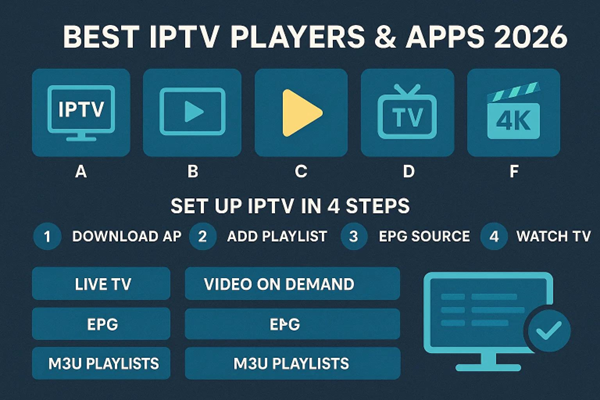
Streaming demand keeps rising, and the right IPTV player turns shaky playback into a smooth viewing session. IPTV (Internet Protocol Television) delivers live TV and video-on-demand (VOD) over the internet. This guide walks you through the best IPTV media players and apps for 2026, what each does best, and simple steps to get them running. With the right tools you’ll get steadier playback, clearer pictures, and faster channel navigation.
Below we cover leading IPTV apps, top Android players, Smart TV options, and clear setup instructions for the most popular players. We also explain which features matter and how Xtreme HD IPTV works with these players to improve your streaming. By the end you’ll know which apps fit your devices and how to get them running quickly.Xtreme HD IPTV
Key Takeaways
- Xtreme HD IPTV and IPTV Smarters Pro pair simple interfaces with wide channel support and reliable playback.
- Top Android players focus on stable streaming, useful customization, and broad device compatibility.
- Smart TV apps make it easy to watch in HD or 4K with straightforward setup and clear channel management.
- Typical setup steps: subscribe, install the player, sign in (or add M3U/portal), then select channels and start watching.
- VLC can play IPTV via network stream (M3U) and supports many formats for flexible testing and playback.
- Stable internet, current app versions, and tuned in-app settings are essential for peak performance.
- Choose players with wide device support, an intuitive UI, rich channel variety, and dependable high-quality streaming.
- Xtreme HD IPTV subscriptions are designed to be affordable, fast, and compatible with many popular players.
- Leading apps now support 4K streams and include Electronic Program Guides (EPG) for easier scheduling and navigation.
What Are the Best IPTV Media Player Apps for 2026?
In 2026 a handful of apps stand out for reliability, features, and cross-device support. These are our top contenders:
- Xtreme HD IPTV Player: Clean, user-friendly, and optimized for smooth playback across formats and large channel lists.
- IPTV Smarters Pro: Highly customizable — supports multiple playlists and profiles for shared households.
- TiviMate: Modern UI and advanced channel management for power users and living-room setups.
- Perfect Player: Lightweight and no-nonsense — great if you just want fast access to IPTV content.
- OTT Navigator: Packed with organization tools for managing large playlists and multiple sources.
- VLC Media Player: Open-source and dependable, with broad format support and network streaming capabilities.
Each app provides live channels and VOD — pick the one whose features and layout match how you like to watch.
Top IPTV Players for Android Devices
Android users have several solid players that balance speed and usability:
- Xtreme HD IPTV Player: Tuned for Android — delivers steady streaming on phones and TV boxes.
- IPTV Smarters Pro: Smooth navigation and playlist support make it a mobile and Android TV favorite.
- TiviMate: Sleek design and scheduling options are ideal for set-top boxes and Android TV.
- Perfect Player: Simple and efficient — for users who prefer a minimal setup.
- OTT Navigator: Advanced management for users with extensive playlists and multiple sources.
- VLC Media Player: Versatile and reliable for many file types and network streams on Android devices.
These players emphasize stable playback, responsive controls, and broad compatibility across Android hardware.
Leading Smart TV IPTV Apps and Their Features
Smart TVs are increasingly the main screen for IPTV. These apps bring the best experience to the big screen:
- Smart IPTV: Easy setup and clear navigation — built specifically for TV-first use.
- IPTV Smarters Pro: Customizable layouts that work well with TV remotes and large displays.
- TiviMate: Rich guide and playback options designed for living-room viewing.
- OTT Navigator IPTV: Powerful management tools for heavy users with many channels.
- GSE Smart IPTV: Supports multiple formats and playlist types for flexibility on Smart TVs.
- XCIPTV Player: Intuitive interface that prioritizes ease of navigation and smooth streaming.
These apps simplify channel browsing, EPG access, and playback settings on Smart TV platforms.
How to Set Up IPTV Streaming on Popular Media Players?
Getting started is usually quick. Follow these basic steps:
- Subscribe to Xtreme HD IPTV: Pick the plan that fits your household and devices.
- Install the App: Download your chosen IPTV player from the app store for your device.
- Login: Open the player and enter your Xtreme HD IPTV account credentials or M3U/portal details.
- Start Streaming: Browse channels, import playlists if needed, and play your preferred content.
Most users will be watching within a few minutes after these steps.
Step-by-Step VLC IPTV Streaming Setup Guide
VLC is handy for testing and lightweight IPTV playback. Here’s how to use it:
- Download VLC: Install the latest VLC build for your platform.
- Open VLC: Launch the app and open the “Media” menu.
- Select “Open Network Stream”: Paste the M3U playlist URL provided by your IPTV service.
- Click “Play”: VLC will start streaming channels from the playlist.
VLC is a flexible, format-friendly option for reliable playback and quick checks.
Configuring Android IPTV Players for Optimal Performance
Small adjustments can noticeably improve streaming on Android devices:
- Stable Internet Connection: Use wired Ethernet or 5 GHz Wi‑Fi for set-top boxes and smart TVs whenever possible.
- Update the App: Keep your IPTV player current to benefit from bug fixes and improved performance.
- Adjust Settings: Tweak video quality, buffering size, and hardware decoding based on your device’s capability.
These tweaks reduce buffering and keep picture quality steady across sessions.
Mobile performance matters: efficient network handling and optimized codecs make a big difference on phones and tablets.
Improving Mobile IPTV Quality of Experience
Network policies and transcoding choices directly affect playback quality on mobile devices. Adapting the stream to changing network conditions can significantly improve Quality of Experience (QoE).
— J. Lloret, 2012
Which Features Should You Look for in IPTV Media Players?
Prioritize these features when choosing a player:
| Feature | Description | Importance |
| Device Compatibility | Runs on your devices (Android, Smart TV, Windows, macOS, etc.) so playback is seamless | High |
| User Interface | An intuitive, responsive UI that makes browsing channels and changing settings effortless | High |
| Channel Variety | Handles large playlists and multiple sources so you have diverse viewing options | High |
| Quality and Speed | Delivers stable HD/4K streaming with low buffering and efficient buffering controls | High |
| Support and Updates | Regular app updates and dependable customer support for troubleshooting | Medium |
These factors determine how usable and future-proof a player will be.
Good design and practical features are central to user adoption as mobile IPTV and app ecosystems evolve.
Innovative User Interfaces for Mobile IPTV Growth
A human-centered interface is critical for mobile IPTV adoption. Growth depends on intuitive controls and layouts that match user expectations.
— S. Zeadally, 2011
Subscription Compatibility and User Experience Factors
When choosing a service, check these subscription and UX items:
- Multiple Subscription Tiers: Find plans that match your device count and viewing needs.
- Device Compatibility: Confirm support for the devices you own to avoid access issues.
- Intuitive Interface: A clean UI reduces setup time and frustration.
Picking the right balance of subscription flexibility and an easy interface improves your daily experience.
How Do IPTV Player Apps Compare: Features and Compatibility?
Compare apps by focusing on real-world functionality and compatibility:
- Features: Look for playlist support, EPG, DVR, and user profiles to match your watching habits.
- Compatibility: Make sure the app runs on your phone, tablet, TV, or set-top box.
- User Ratings: Read reviews to see how apps perform with real playlists and real networks.
This approach helps you pick an app that fits your habits and hardware.
Comparing Android IPTV Players: Performance and Usability
Key metrics to evaluate Android apps include:
- Loading Speed: How quickly channels and playlists appear after launch.
- Buffering: How often playback pauses and how long interruptions last.
- User Experience: Ease of navigation, remote support, and managing favorites and recordings.
These metrics show which player delivers the smoothest everyday experience.
Smart TV IPTV Apps: Platform Support and Streaming Quality
When choosing an app for your Smart TV, check:
- Platform Support: Confirm compatibility with your TV brand and operating system.
- Streaming Quality: Choose apps that reliably deliver HD or 4K for the best picture.
- User Reviews: Look for feedback on playback stability and EPG accuracy.
These checks ensure the app will work well on your TV and deliver consistent quality.
Why Choose Xtreme HD IPTV Subscription with Recommended Players?
Xtreme HD IPTV pairs well with the apps above and offers several practical benefits:
- Cost-Effectiveness: Competitive plans that balance price and channel selection.
- Quality and Speed: Focuses on consistent streaming and minimal buffering.
- Wide Device Compatibility: Built to integrate with most popular IPTV players and platforms.
These strengths make Xtreme HD IPTV a sensible choice for users who want reliable streaming across devices.
Benefits of Using Xtreme HD IPTV with Compatible Media Players
Pairing Xtreme HD IPTV with a supported player gives you:
- Extensive Channel Lineup: A broad selection of live channels for varied viewing.
- On-Demand Content: VOD options so you can watch when it suits you.
- High-Definition Streaming: Support for HD and higher resolutions for a clearer picture.
Using a recommended player helps you access the service’s full feature set reliably.
Enhancing Your Viewing Experience with Subscription Features
To get the most from your subscription, pay attention to these points:
- Internet Speed Requirements: Ensure your bandwidth meets recommended speeds for HD or 4K playback.
- Device Compatibility: Choose hardware that supports your IPTV app and preferred resolution.
- Parental Controls: Use available parental controls to block channels or restrict content for family-friendly viewing.
Active monitoring and quality checks help providers keep service levels high.
Enhancing IPTV Customer Experience Through Performance Monitoring
Service providers invest in end-to-end monitoring to remain competitive. Tracking performance from headend servers to set-top boxes helps detect issues early and reduce user impact. Proactive monitoring and fast fixes improve the user experience and support growth.
— IPTV End-to-End Performance Monitoring, 2011
What Are Common Questions About IPTV Media Players and Apps?
Here are clear answers to common questions about IPTV players and apps:
- What is IPTV?: IPTV (Internet Protocol Television) streams live TV channels and VOD content over an internet connection.
- Are IPTV apps legal?: Legality depends on the content source. Stick to reputable, licensed services to stay within the law.
- Can I use IPTV on multiple devices?: Many services allow simultaneous streams on several devices — check your provider’s terms for device limits.
These basics will help you use IPTV responsibly and effectively.
How to Install IPTV Players on Android and Smart TVs?
Installing IPTV players is straightforward on modern devices. Follow these steps:
- For Android Devices: Open Google Play Store, search for the IPTV player, tap “Install,” and follow the prompts.
- For Smart TVs: Open your TV’s app store, search for the IPTV player, download and install, then follow the on-screen setup steps.
After installation, sign in or add your M3U/portal details to begin streaming.
Which IPTV Apps Support 4K Streaming and Electronic Program Guides?
Several apps support 4K and provide EPGs for easier navigation. Notable options include:
- Xtreme HD IPTV App: Supports 4K streams and includes a user-friendly EPG for schedule browsing.
- IPTV Smarters Pro: Offers 4K playback with a clean EPG layout.
- TiviMate: Known for high-quality playback and a comprehensive EPG experience.
These apps make it simple to find and watch high-resolution content with schedules at a glance.
Frequently Asked Questions
1. What are the internet speed requirements for optimal IPTV streaming?
Recommended speeds vary by resolution: roughly 10 Mbps for SD, 25 Mbps for HD, and 50 Mbps or more for consistent 4K streaming. Multiple devices on the same network will raise overall bandwidth needs.
2. Can I use IPTV services outside my home country?
Many IPTV services work internationally, but availability depends on licensing and regional restrictions. Some users use VPNs to access geo-restricted content — check your provider’s terms and local laws before doing so.
3. How do I troubleshoot buffering issues with IPTV streaming?
Check your internet speed and connection stability first. Restart your router, close bandwidth-heavy apps, or use Ethernet. If problems continue, update the app or contact your IPTV provider for support.
4. Are there parental control features available in IPTV apps?
Yes — many IPTV apps include parental controls to block channels or limit content by rating. Review the app’s settings to set up profiles and access restrictions for children.
5. What should I do if my IPTV app is not working properly?
Verify your internet connection, restart the app and device, and install any updates. If the issue persists, check the app’s support resources or contact your IPTV provider for help.
6. Can I record shows while using IPTV services?
Recording depends on the provider and app. Some services offer DVR functionality for recording live TV; others do not. If recording matters to you, confirm DVR support before subscribing or consider a separate recording device.
7. How do I find the best IPTV service for my needs?
Compare channel selection, streaming quality, device compatibility, and support. Read user reviews and use free trials or money-back guarantees to test performance before committing.
Conclusion
Choosing the right IPTV player or app can noticeably improve your streaming — better picture quality, fewer interruptions, and faster navigation. Knowing the strengths of players like Xtreme HD IPTV helps you pick the best fit for your devices and viewing habits. Try the recommended players, follow the setup steps, and start enjoying smoother, more reliable streaming today.

In the digital age, the way we consume television and media has undergone a significant transformation, and Internet Protocol Television Read more

The landscape of the streaming industry has changed dramatically in recent years, with several players vying for dominance. Typhoon IPTV Read more

How to jailbreak a Chromebook? Chromebooks have gained popularity as lightweight, efficient, and affordable devices that provide seamless integration with Read more

Kemo IPTV is a popular IPTV service provider that delivers television programs and other video content to your device. The Read more