

With more people streaming at home than ever, getting IPTV to work smoothly across rooms is essential. Multiple simultaneous viewers put pressure on bandwidth, device compatibility, and router settings—any of which can cause buffering or poor picture quality. This guide walks through practical, easy-to-apply strategies for better multi-room IPTV: choosing compatible gear, managing user profiles, and squeezing the best performance from your network. Follow these steps to create a more reliable, user-friendly streaming setup for everyone in your household.
Key Takeaways
- Pick devices and services that explicitly support concurrent streams to avoid playback conflicts.
- Set up multi-room IPTV by checking network speeds, picking a solid provider, and configuring your router to prioritize streaming traffic.
- Smart TVs, dedicated streaming sticks, and phones/tablets commonly work well in multi-room setups.
- Create separate user profiles so each person keeps their watch history, preferences, and limits without affecting others.
- Use parental controls to block unsuitable content, set viewing windows, and review children’s watch history.
- Upgrading your plan, preferring wired connections, and enabling QoS on the router all help reduce buffering.
- Bandwidth rules of thumb: ~3 Mbps for SD, 5–8 Mbps for HD, and ~25 Mbps per 4K stream.
- Cut background bandwidth usage, place the router centrally, and reboot it periodically to reduce interruptions.
- Budget-friendly IPTV plans can still offer multiple simultaneous streams and solid channel lineups for shared homes.
Best IPTV Solutions to Optimize Streaming in Shared Households and Multi-Room Environments
Choosing the right IPTV provider and equipment makes all the difference for shared households. The best solutions combine broad device support, multiple concurrent streams, and a clean user experience. When evaluating options, focus on these essentials:
- Device Compatibility: Confirm the service supports the devices your household uses—smart TVs, streaming sticks, and mobile apps.
- Simultaneous Streaming Capabilities: Opt for plans that allow multiple concurrent streams so family members can watch different channels without disruption.
- User Experience Features: Look for an intuitive guide, quick navigation, and responsive customer support to keep everyone satisfied.
Together these features help deliver a smooth, predictable viewing experience across rooms and devices.
How to Set Up Multi-Room IPTV Streaming for Shared Households?

Planning your network and service setup ahead of time prevents most multi-room headaches. Use this straightforward checklist to get everything running smoothly:
- Assess Your Home Network: Test your current internet speed and confirm your router can handle several high-bandwidth streams at once.
- Choose an IPTV Service Provider: Pick a reliable provider that supports the number of simultaneous streams you need and works with your devices.
- Configure Your Router Settings: Enable Quality of Service (QoS) or traffic prioritization for streaming devices to reduce lag and buffering.
Completing these steps gives you a stable multi-room IPTV foundation that serves every household member.
Which devices are compatible with multi-room IPTV streaming?
Most modern consumer devices handle IPTV well, giving you flexible viewing options. Typical choices include:
- Smart TVs: Built-in apps on contemporary smart TVs usually support major IPTV services.
- Streaming Devices: Sticks and boxes like Roku, Amazon Fire TV, and Apple TV are reliable and simple to set up.
- Mobile Devices: Smartphones and tablets let users watch anywhere in the home or on the go.
Mix and match these devices to suit each room and user preference.
What are the steps to configure IPTV across multiple rooms?
Getting IPTV running across rooms is a repeatable process. Do this on each device you want to use:
- Connect Devices: Make sure every device is on the same home network—preferably a strong 5 GHz Wi‑Fi band or an Ethernet connection.
- Install IPTV Apps: Download the provider’s app to each TV, box, or mobile device you plan to use.
- Log In to Your Account: Sign in with your IPTV credentials on each device so everyone can access subscribed channels and VOD.
Following these steps keeps access consistent and reduces setup friction across rooms.
What Are Effective IPTV Profile Management Tips for Shared Users?
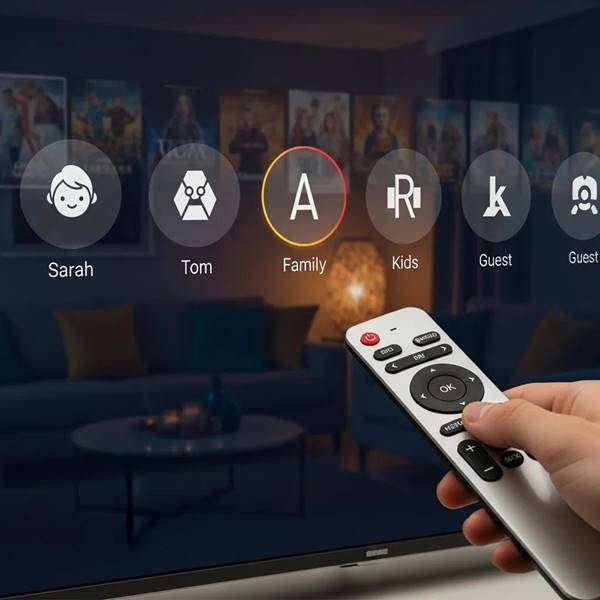
Profiles help personalize viewing and prevent cross-user clutter. Use these tips to manage profiles in a shared household:
- User Access Control: Create individual profiles to keep watchlists, recommendations, and history separate.
- Bandwidth Allocation: Monitor heavy users and, where possible, assign bandwidth priorities to prevent one stream from degrading others.
- Device Compatibility: Verify that all household devices support profile switching so everyone can use their own settings.
Clear profile management makes the system simpler and fairer for everyone in the home.
How to create and manage multiple user profiles on IPTV?
Most IPTV apps make profile setup quick and intuitive. The usual flow looks like this:
- Access the IPTV Service: Sign in to your account on the primary device or web portal.
- Navigate to Profile Settings: Open the settings menu and find the profiles or accounts section.
- Create New Profiles: Add profiles for each household member and let them personalize their preferences and parental settings.
Profiles help keep recommendations relevant and prevent watch history from overlapping.
How do parental controls enhance IPTV experience in shared households?
Parental controls add a layer of safety and structure for families. They typically offer:
- Content Blocking: Restrict access to age-inappropriate channels or shows.
- Viewing Restrictions: Set time limits or block categories during homework or bedtime hours.
- Monitoring Viewing History: Review what kids have watched so you can discuss content and make informed choices.
Using these controls creates a safer, more manageable viewing environment for children and peace of mind for parents.
How Can You Optimize Bandwidth and Reduce Buffering in Multi-Device IPTV Streaming?
Minimizing buffering usually comes down to giving streaming traffic the bandwidth it needs and reducing interference. Practical steps include:
- Upgrade Your Internet Plan: If you regularly run multiple high-definition streams, a faster plan can eliminate contention.
- Use Wired Connections: Ethernet delivers the most stable performance and is highly recommended for set-top boxes and smart TVs.
- Implement QoS Settings: Configure your router to prioritize media streaming so video packets get through first during busy periods.
These measures are often enough to make multi-room viewing dependable for the whole household.
Research into peer-assisted IPTV also shows strategies to balance server load and improve delivery during peak hours.
Bandwidth Optimization for Peer-Assisted IPTV
Researchers describe an approach—an algorithm named Zebra—that pre-distributes (pre-stripes) content across peers during idle times so P2P delivery is faster when demand spikes. Simulations indicate Zebra can reduce load on the central content server during peak viewing periods.
Towards capacity and profit optimization of video-on-demand services in a peer-assisted IPTV platform, YF Chen, 2009
What bandwidth requirements support smooth multi-room IPTV streaming?
Use these baseline figures when sizing your plan for multiple streams:
- SD Streaming: Around 3 Mbps per stream.
- HD Streaming: Typically 5–8 Mbps per stream for reliable picture quality.
- 4K Streaming: Roughly 25 Mbps or more per stream to avoid buffering.
Multiply these targets by the number of simultaneous viewers to estimate a suitable internet speed for your household.
Which techniques help minimize buffering in shared IPTV environments?
Simple fixes often yield big improvements. Try these:
- Limit Background Activities: Pause large downloads, cloud backups, or other heavy uploads while streaming.
- Optimize Router Placement: Put the router centrally and elevated to maximize coverage across rooms.
- Regularly Restart Your Router: A quick reboot clears transient issues and can restore peak performance.
Applying these tactics will reduce interruptions and keep streams cleaner for everyone.
What Are Affordable IPTV Subscription Plans Suitable for Multi-Room Use?
Value and simultaneous-stream limits matter most when choosing plans for shared households. Xtreme HD IPTV provides budget-conscious options designed to support multiple users and a broad channel mix.
- Monthly Plan: $9.99/month
- Bronze Plan: $29.99/month (currently discounted to $9.99/month)
Both plans include access to live channels and VOD content, making them solid choices for families and shared living spaces.
How do subscription plans compare for multi-device streaming capabilities?
When you compare plans, focus on these practical factors:
- Number of Simultaneous Streams: Confirm how many concurrent streams each plan allows—this determines whether everyone can watch what they want at the same time.
- Device Compatibility: Make sure the plan supports the TVs, boxes, and mobile devices you use daily.
- Pricing Comparison: Balance cost against stream limits and available channels to find the best overall value.
These considerations help you pick a plan that matches your household’s viewing patterns and budget.
What value do affordable IPTV plans offer for shared households?
Affordable IPTV plans often beat traditional cable on price and flexibility. Typical benefits include:
- Cost-Effectiveness: Lower monthly fees compared to many cable packages.
- Flexibility: Choose plans and add-ons that fit your family’s viewing habits.
- Convenience: A single subscription can cover multiple rooms and devices without juggling several services.
For many households, the combination of savings and multi-room access makes budget IPTV plans an attractive option.
Frequently Asked Questions
What should I consider when choosing an IPTV service for a shared household?
Look for device compatibility, the number of simultaneous streams allowed, and a user interface everyone in the home can navigate. Also check for strong customer support and reliable app updates. These factors together ensure smooth operation across TVs, streaming boxes, and mobile devices.
How can I improve Wi-Fi coverage for better IPTV streaming?
Place your router in a central, elevated spot to improve coverage. For larger homes, consider mesh Wi‑Fi systems or targeted extenders to eliminate dead zones. Keep the router firmware up to date and reduce interference from cordless phones or microwaves for steadier connections.
What are the benefits of using wired connections for IPTV streaming?
Wired Ethernet connections are more stable and offer lower latency than Wi‑Fi, which is especially important for HD and 4K streams. They reduce buffering and provide consistent bandwidth—ideal for living-room TVs and set-top boxes that handle heavy streaming.
How can I manage bandwidth effectively in a shared household?
Use your router’s QoS features to prioritize streaming traffic and monitor which devices consume the most bandwidth. Encourage scheduled large downloads outside peak viewing hours and upgrade your plan if multiple high-quality streams become routine.
What troubleshooting steps can I take if my IPTV streaming is buffering frequently?
First, test your internet speed to ensure it meets the stream requirements. Restart your router, reduce the number of active devices, and try a wired connection where possible. If problems persist, check for app or firmware updates and consider upgrading your internet package.
Are there specific IPTV services recommended for large families?
Large families should choose providers that permit several simultaneous streams and offer comprehensive channel lineups. Services like Xtreme HD IPTV are often recommended for their price-to-feature balance and profile management options, which help households personalize access for each member.
Conclusion
Optimizing multi-room streaming comes down to the right mix of service, hardware, and network tuning. With clear profile management, prioritized bandwidth, and compatible devices, families can enjoy reliable, uninterrupted IPTV across the home. Use the tips here to tighten your setup and get the most from your subscription—then sit back and stream with confidence.

In the digital age, the way we consume television and media has undergone a significant transformation, and Internet Protocol Television Read more

The landscape of the streaming industry has changed dramatically in recent years, with several players vying for dominance. Typhoon IPTV Read more

How to jailbreak a Chromebook? Chromebooks have gained popularity as lightweight, efficient, and affordable devices that provide seamless integration with Read more

Kemo IPTV is a popular IPTV service provider that delivers television programs and other video content to your device. The Read more